Date: July 28, 2023
TAB number: SWH-TAB-000035844-B
Issue statement
After a brownout condition, HID iCLASS SE readers might display adverse behavior. When the iSTAR panel
powers up or is rebooted, the input voltages for the affected HID readers might drop below the specified voltage
of 5-16 VDC for a brief period.
Background
Reader symptoms can include:
- A dim white-to-light pink LED
- A continuous audible buzzer
- No LED or buzzer activity
- Readers do not respond to badges
Affected versions
This issue affects the following items:
- HID iCLASS SE and multiCLASS SE readers, in Wiegand output mode
- iSTAR Ultra, iSTAR Ultra SE, iSTAR Ultra G2, and iSTAR Ultra G2 SE
Solution
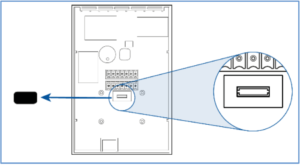
To protect against the brownout condition, install an HID HSI Reset Module in the iCLASS SE reader expansion
slot. This module is designed to hold the reader’s internal microcontrollers in reset during a power event and
prevents the brownout symptoms.
Before you install the module, ensure the reader is powered off. Remove the reader from its backplate, remove
the electrical tape covering the module expansion slot (located below the wiring connector or pigtail), and insert
the module. Reinstall the reader on the backplate, power up, and confirm operation.
You can order the modules from Software House, using part number HID-EDP-00186.