Article ID: SWH-TAB-nID-000035095
Published: Jul-15-2022
As described in SWH-TAB-000023350; Windows10 font scaling and DPI affects UI wording and placement.
C-Cure Client applications may display/ place text incorrectly in High DPI environments, when scaling of text is used to promote legibility within the OS.
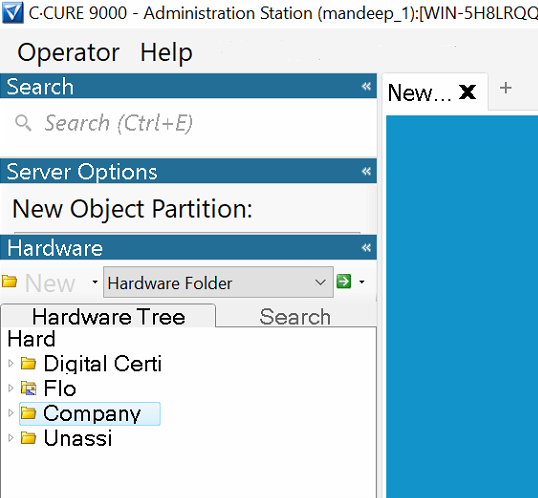
The usual fix for this, is to Disable High DPI scaling/ Override DPI scaling behaviour to allow the System to perform the scaling.
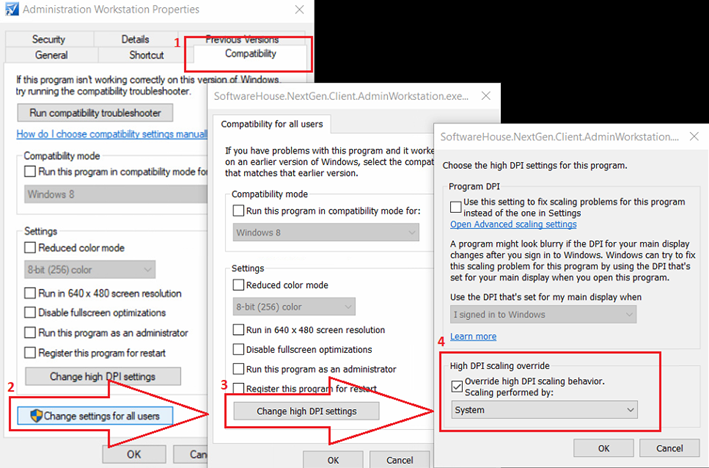
However, in situations where RDP is being used to access a C-Cure Client app, and the local machine has High DPI scaling and cannot be changed, The above fix may not work depending on OS.
*Note Windows Server 2019 seems to handle scaling better and usually will not need intervention.
The following can be done to ignore scaling behaviour inherited from the connecting machine.
To fix for Windows 2012/ 2016 if being connected to via RDP session:
On each RDP/RDS Session Server (The machine being connected to by RDP):
Add the following key if it does not already exist and set its value to 1:
HKEY_LOCAL_MACHINE\SYSTEM\CurrentControlSet\Control\Terminal Server\WinStations\IgnoreClientDesktopScaleFactor
If IgnoreClientDesktopScaleFactor does not exist, then create a new DWORD-value (32bit)
Type in Decimal Value: 1
(value of 0 to turn off if needed)
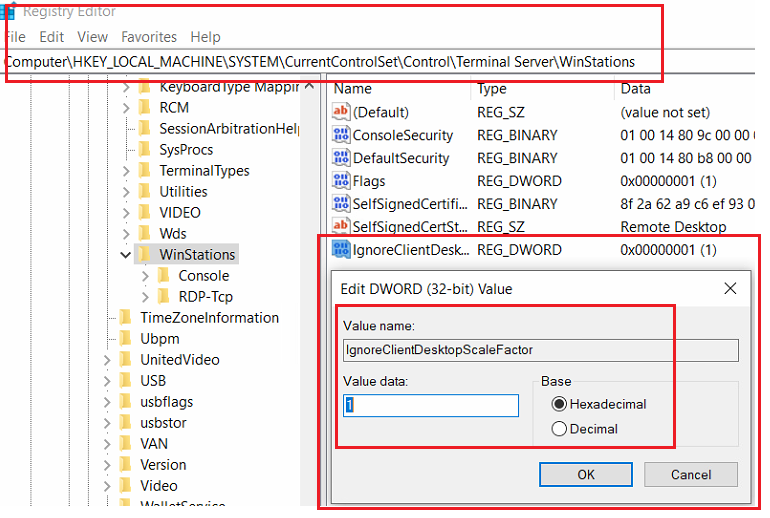
Reconnect via RDP, scaling is no longer inherited.
CCure9000_SWH-TAB-nID-000035095_lt_en.pdf