Article ID: SWH-KB-000037776
Warning – Level 3 Document – Please to no distribute.
Clearance Activation and Expiration date change in 3.00.3
C•CURE 9000 3.00.x the minimum activation and expiration date for clearances is 01/01/1990 12:00:00AM. Previous versions the date was 1/1/1970 12:00:00 AM.
In certain scenarios you will be unable to update the clearance (adding doors removing doors, ….)
Save and close might result in an error message complaining about the Date field value must be after 1/1/1990 12:00:00AM.
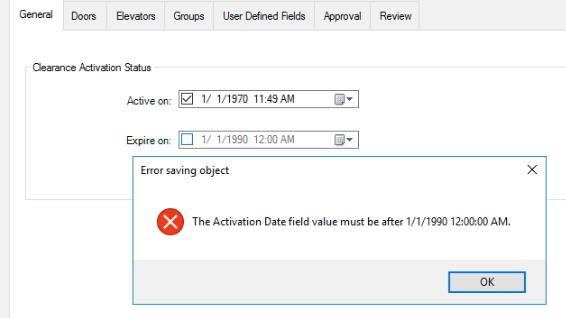
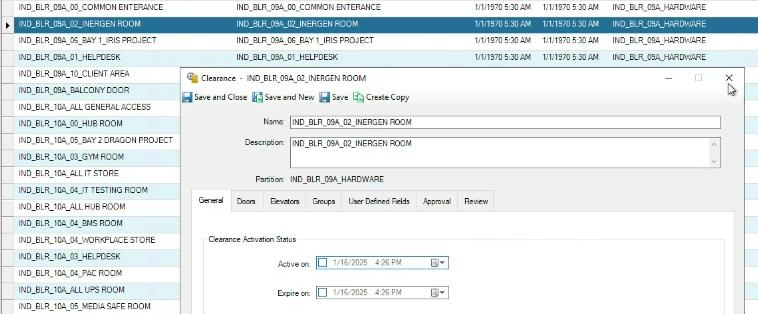
If the Activation or Expiration dates are not used; option unchecked and the greyed out date field shows the current date and time; but still running into the same -> THEN “The Clearance Dynamic View” will provide the actual Activation and Expiration date as saved in the database.
Example Below: In this case “1/1/1970 5:30:00AM”
Workaround
- Manually set the dates to something after 1/1/1990 , the user interface will stop you if the dates do not meet the correct criteria.
- In a case where there are too many Clearances to update one at a time (or unwilling to do this); you can update the dates manually in SQL.
- Trying to do a Bulk Update via Set Property will not work as you only can select 1 field at a time; the system will complain about the other date value what is still incorrect for 3.00.x.
SQL Statement Example
Updating Expiration Date and Activation Date via SQL: In this example we are updating the dates to null where the current Activation date is less than 1990-01-02 .
Stop services and perform backup of Databases prior to SQL data manipulation.
From SSMS execute the following:
USE ACVSCore;
UPDATE access_clearance
SET ActivationDate = NULL,
ExpirationDate = NULL,
UseActivationDate = 'False',
UseExpirationDate = 'False'
WHERE ActivationDate < '1990-01-02';
Restart Crossfire.
SWH-KB-000037776.pdf