Article ID: SWH-KB-000037697
Environment
- Operating System: Windows 10, Windows 11
- Web Server: Microsoft IIS
- Application: C•CURE IQ
- IIS Application Pool: DefaultAppPool
Issue
Only two C•CURE IQ client sessions can be established when C•CURE IQ is hosted on Windows 10 or 11.
By default, Windows client operating systems (Windows 10 and Windows 11) support a single IIS worker process. This single worker process supports a maximum of 10 threads.
C•CURE IQ uses 4 threads per client connection. As a result, a Windows 10 or Windows 11 system configured with the default IIS settings can only support two concurrent C•CURE IQ client logins (8 threads total), with no remaining capacity for additional users.
Cause
The limitation is caused by the default IIS configuration on Windows client operating systems, which restricts the application pool to:
- 1 IIS worker process
- 10 total threads available
Because each C•CURE IQ client consumes 4 threads, the available thread count is quickly exhausted, limiting the number of concurrent IQ client connections.
Resolution
Increase the number of supported C•CURE IQ clients by configuring an IIS as follows. This is done by increasing the number of worker processes for the application pool.
Configuration Steps
- Open Internet Information Services (IIS) Manager.
- Navigate to Application Pools.
- Select DefaultAppPool.
- Click Advanced Settings…
- Locate Maximum Worker Processes.
- Change Maximum Worker Processes to a higher value.
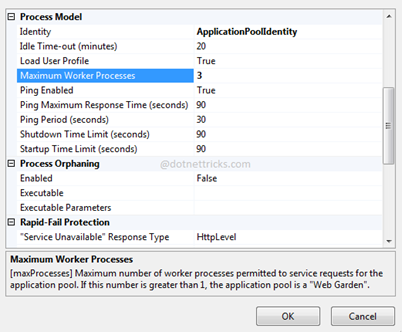
- For example, setting this value to 3 provides:
- 30 total available threads
- 7 concurrent C•CURE IQ clients
- (4 threads × 7 clients = 28 threads used)
Result
Increasing the number of IIS worker processes allows additional threads to be available, which directly increases the number of C•CURE IQ clients that can connect simultaneously on a Windows 10 or Windows 11 system.
Notes
- This configuration change applies only to Windows client operating systems.
- Server-class operating systems (for example, Windows Server) do not have the same default worker/thread limitations.
- Changes take effect immediately but may briefly recycle the application pool.