Article ID: SWH-KB-000038555
Overview
If the Windows PRINT SPOOLER Service isn’t running on the C•CURE server or remote client PC, you won’t be able to run C•CURE 9000 Queries on that PC. The problem symptoms are as follows:
- You’ll initially be able to run a Query once after opening the C•CURE Administration application
- Afterwards, you won’t be able to run a Query again. No errors will get logged anywhere, neither in C•CURE SystemTrace logging nor in the Windows Event viewer logs.
- If you close C•CURE Administration application and re-open it, you’ll again be able to run a Query once. But any further attempts to run a Query will fail.
This behavior is only occurring with C•CURE 9000 v2.90.
The same behavior can’t be reproduced in C•CURE versions 3.0 or 3.10.
Solution
On C•CURE server and remote client PCs:
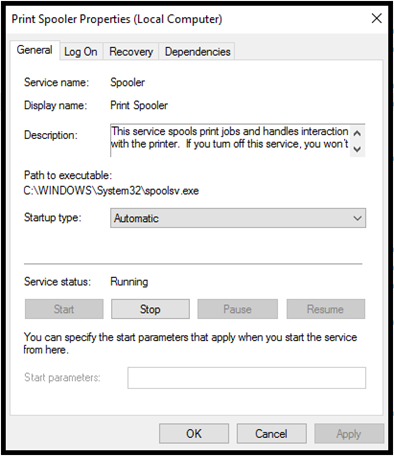
- Ensure that the Windows PRINT SPOOLER Service startup type is set to “Automatic”,
- Ensure that the Windows PRINT SPOOLER Service is running.