Date: June 13, 2023
TAB number: SWH-TAB-000036444
Topic: iSTAR Web Page Diagnostic Utility issue on Google Chrome and Microsoft Edge
Issue Statement
There is an issue viewing and editing the iSTAR Default Gateway and Connect Ethernet Adaptor fields on a webpage when using the iSTAR Web Page Diagnostic Utility on Google Chrome or Microsoft Edge browsers.
Background
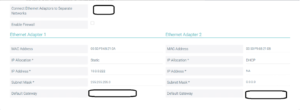
Some iSTAR Web Page fields do not render correctly on Google Chrome v114.x and Microsoft Edge v114.x. The following fields do not display information and cannot be edited:
- Ethernet Adapter 1 Default Gateway
- Ethernet Adapter 2 Default Gateway
- Connect Ethernet Adapters to Separate Networks
Affected versions
This issue affects the following items and C•CURE versions:
-
iSTAR controllers impacted: iSTAR Ultra, iSTAR Ultra G2, iSTAR Ultra LT, iSTAR Edge G2.
-
Fields impacted: Ethernet Adapter 1 Default Gateway, Ethernet Adapter 2 Default Gateway, Connect
Ethernet Adaptors to Separate Networks.
Workarounds
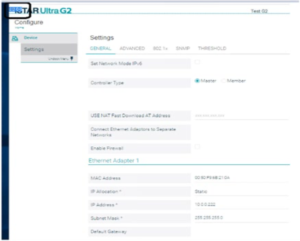
- On the Settings page, click Edit and then click in the Subnet Mask field. On your keyboard, press the Tab key. The Default Gateway field displays in the top left of your web browser, as shown in Figure 2 below. Enter the Gateway IP address, press the Tab key, and then click Save. The Gateway IP address is saved but the field is still blank.
Note: This workaround is not applicable for the Connect Ethernet Adaptors to Separate Networks field.
2. Use a different browser, such as Mozilla Firefox.
3. Revert to an earlier version of Google Chrome or Microsoft Edge.
Solution
SPAR 862681 will resolve this issue and will be released as part of firmware version 6.9.2 CU01.